HostRite’s 5-Star UpdraftPlus WordPress Backup Plugin Review
Ultimate UpdraftPlus Review 2026 confirms a reliable backup system is among the most important WordPress tools.
At HostRite Cloud Hosting, this isn’t simply a theoretical recommendation. We actually use UpdraftPlus Review on this website. Moreover, this provides an opportunity to review the plugin from a real operator’s viewpoint.
After using and evaluating its capabilities, HostRite gives UpdraftPlus 5 out of 5 stars.
One feature particularly stands out to us: remote backup storage.
A backup shouldn’t merely exist.
Ideally, at least one usable copy should be stored somewhere separate from the website’s hosting server (Ultimate UpdraftPlus Review 2026).
That’s important because keeping your website and your only backup in the same place creates an unnecessary point of failure.
UpdraftPlus itself recommends storing backups remotely so they remain independently accessible if something happens to the hosting provider or server. (TeamUpdraft)
Furthermore, UpdraftPlus supports an impressive selection of remote storage services, while Premium can send backups to multiple remote destinations simultaneously. (TeamUpdraft)
For HostRite, that flexibility is one of the biggest reasons UpdraftPlus deserves a five-star rating.
What Is UpdraftPlus?
Additionally, UpdraftPlus is a WordPress backup, restoration and migration plugin.
At its most basic level, the plugin allows WordPress website owners to create backups containing important website files and database information.
However, it goes much further.
Depending on the version and configuration, UpdraftPlus provides:
- Manual backups
- Scheduled automatic backups
- Remote cloud backups
- WordPress restoration
- Website migration
- Multiple remote backup locations
- Incremental backups
- Automatic backups before updates
- Advanced retention rules
- Database encryption
- Detailed backup reports
- WordPress Multisite support
Therefore, Ultimate UpdraftPlus Review 2026 sees UpdraftPlus as more than simply a tool for occasionally downloading a copy of WordPress.
It can become an important part of a website’s overall recovery strategy.
Why HostRite Uses UpdraftPlus
There are numerous WordPress backup plugins available.
However, one of the reasons HostRite uses UpdraftPlus on this website is the balance it provides between usability and advanced functionality.
Creating a backup shouldn’t require a website owner to become a server administrator.
At the same time, a serious backup solution should provide enough flexibility for more advanced users.
UpdraftPlus does both particularly well.
However, the feature that deserves special attention is its ability to move backups off the website’s hosting server and into remote storage.
For us, that’s an important distinction.
Why Remote WordPress Backups Matter
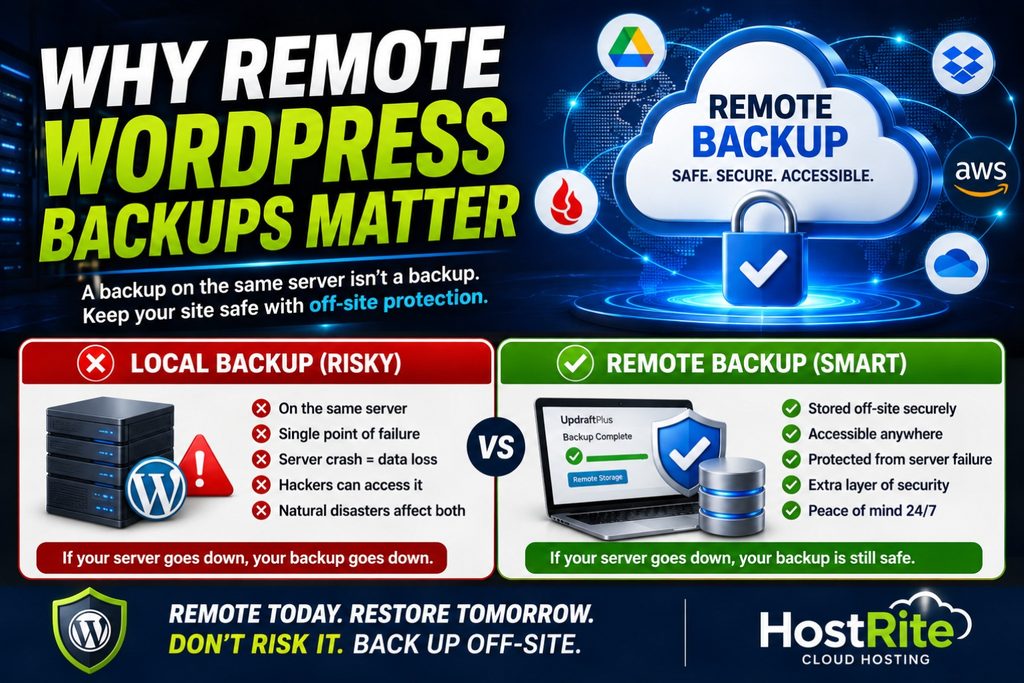
Remote WordPress backups protect sites from outages and hacks. In an UpdraftPlus Review, experts highlight reliable remote storage as essential.
Suppose you create a perfect backup of your WordPress website.
However, that backup remains on the exact same hosting server as the website.
Now imagine that server becomes inaccessible.
Your website may be unavailable.
Unfortunately, your backup may also be inaccessible.
UpdraftPlus documentation makes essentially the same point. By default, backups can reside within the site’s wp-content area, but TeamUpdraft strongly recommends remote storage so backup files remain independently accessible if there is a server crash or loss of hosting service. (TeamUpdraft)
That’s why HostRite considers remote backup support one of the most important UpdraftPlus features.
A good backup strategy shouldn’t merely ask:
“Do I have a backup?”
It should also ask:
“Where is my backup?”
and:
“Can I still access it if my website or server becomes unavailable?”
Those are very different questions.
Where Can UpdraftPlus Store Remote Backups?
This is where UpdraftPlus becomes particularly impressive.
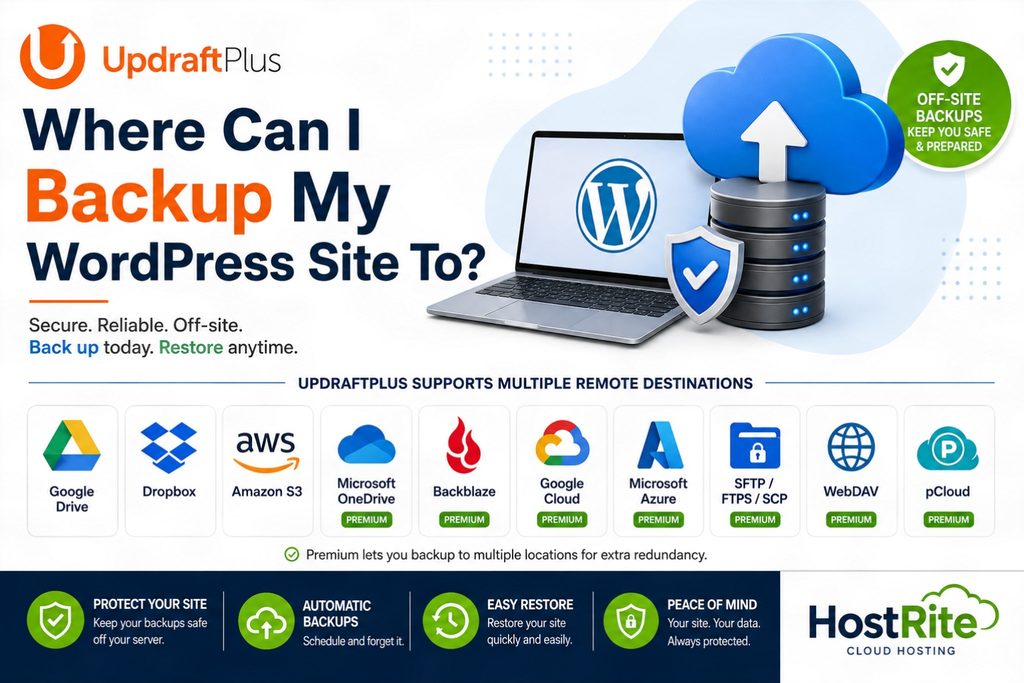
The free version supports numerous remote backup destinations, including:
- Google Drive
- Dropbox
- Amazon S3
- Rackspace Cloud Files
- FTP
- DreamObjects
- OpenStack Swift
UpdraftPlus documentation also identifies S3-compatible storage among its supported options. (TeamUpdraft)
That gives website owners considerable freedom.
For example, someone already using Google Drive doesn’t necessarily need to purchase an entirely different cloud-storage service just to start remotely backing up WordPress.
Likewise, businesses already using Amazon S3 can integrate their WordPress backup strategy with that infrastructure.
This flexibility is a major advantage in HostRite’s assessment.
UpdraftPlus Premium Adds Even More Remote Backup Locations
The remote-storage options become considerably more extensive with UpdraftPlus Premium.
Premium adds destinations including:
- Microsoft OneDrive
- Microsoft Azure
- Google Cloud
- Backblaze
- SFTP
- FTPS
- SCP
- WebDAV
- pCloud
Furthermore, Premium provides enhancements for several storage services already supported by the free version. (TeamUpdraft)
Consequently, UpdraftPlus can fit into a wide range of existing cloud-storage environments.
That matters for businesses.
Instead of forcing everyone into one particular backup provider, UpdraftPlus lets website owners choose storage infrastructure that makes sense for them.
Multiple Remote Backup Locations Are a Standout Premium Feature
This is one of the features HostRite particularly likes.
UpdraftPlus Premium can send backups to multiple remote storage locations.
Why does that matter?
Because even remote storage can experience problems.
For example:
- A cloud account could become inaccessible.
- Credentials could be lost.
- Someone could accidentally delete backup files.
- A storage provider could experience an outage.
- An account configuration problem could prevent access.
- A backup location itself could become compromised.
If your entire recovery strategy depends on one copy in one location, you still have a single point of failure.
Premium allows you to select multiple remote storage destinations, creating additional redundancy. TeamUpdraft describes this as essentially backing up your backups: if one remote copy becomes unavailable, another may still be available. (TeamUpdraft)
For HostRite, this is one of the strongest reasons to consider UpdraftPlus Premium.
A Better WordPress Backup Strategy Uses Redundancy
There’s an important difference between having several backups and having several independent copies of your backups.
Imagine having ten backups stored on one server.
That’s useful if you accidentally delete a page and want to roll back several days.
However, if that entire server becomes unavailable, all ten backups could potentially become inaccessible together.
Now consider having backups stored in separate locations.
For example:
Website → Hosting Server
Backup Copy #1 → Remote Cloud Storage
Backup Copy #2 → Different Remote Storage Provider
Now a failure in one location doesn’t necessarily eliminate every recovery option.
TeamUpdraft similarly recommends keeping at least one copy off-site and, where possible, maintaining more than one backup location. (TeamUpdraft)
That’s the type of backup strategy HostRite prefers.
What Is UpdraftVault?
Website owners who don’t want to configure a third-party cloud provider also have another option.
UpdraftVault is TeamUpdraft’s integrated remote-storage service.
Because it is specifically designed to work with UpdraftPlus, setup is intended to be straightforward. Backups can be accessed and restored directly through UpdraftPlus. (TeamUpdraft)
UpdraftPlus Premium currently includes 1GB of integrated UpdraftVault storage, with additional storage available separately. (TeamUpdraft)
UpdraftVault is built on Amazon’s S3 infrastructure and stores redundant copies of backups across data-center infrastructure. TeamUpdraft also says data travels directly from the UpdraftPlus plugin to the storage cloud rather than being routed through TeamUpdraft’s own servers. (TeamUpdraft)
For website owners who want remote storage without configuring a separate cloud-storage account, UpdraftVault is an appealing option.
UpdraftVault Uses Geographically Distributed Storage
Another interesting detail is how UpdraftVault handles backup storage.
TeamUpdraft says UpdraftVault stores redundant copies in multiple locations and prioritizes data centers near the customer’s geographic region. Current locations include facilities across the United States, Canada, Europe, Asia, Australia and Brazil. (TeamUpdraft)
That makes UpdraftVault more than simply another folder attached to your WordPress installation.
It is genuinely off-site storage infrastructure.
For HostRite, that’s the important part.
The backup isn’t useful merely because it exists.
It needs to remain accessible when you need it.
UpdraftPlus Can Back Up to Google Drive
Google Drive will likely be one of the most recognizable options for ordinary WordPress users.
UpdraftPlus supports Google Drive remote backups in its free version.
Therefore, a website owner can configure WordPress backups to be transferred away from the hosting server into a Google Drive account.
Premium adds another useful feature: backups can be organized into subfolders rather than being restricted to the default application folder. (TeamUpdraft)
This can be particularly useful when managing multiple websites.
Organization becomes increasingly important as the number of backups grows.
UpdraftPlus Can Back Up to Dropbox
Dropbox is another supported remote-storage destination.
Like Google Drive, it is available with the free version.
Premium again improves the integration by allowing backups to be organized into subfolders. (TeamUpdraft)
For website owners already paying for Dropbox storage, this can be a convenient way to use existing resources for WordPress backups.
UpdraftPlus Supports Amazon S3
More advanced users and businesses may prefer Amazon S3.
UpdraftPlus supports Amazon S3 in the free version, while Premium adds several useful S3 enhancements.
Premium can use Amazon’s Infrequent Access storage tier, which TeamUpdraft says can reduce storage costs compared with frequent-access classes.
Additionally, Premium provides options for server-side encryption and creating an IAM user with restricted access to the backup bucket. (TeamUpdraft)
These are exactly the kinds of advanced features that make UpdraftPlus useful beyond basic personal blogs.
UpdraftPlus Premium Supports Google Cloud
Google Drive and Google Cloud Storage shouldn’t be confused.
Google Drive is primarily a consumer and business file-storage service.
Google Cloud Storage is object-storage infrastructure designed for cloud applications and business workloads.
UpdraftPlus Premium supports Google Cloud Storage and allows users to select a storage bucket, location and supported storage class. (TeamUpdraft)
Again, this demonstrates one of the plugin’s strengths.
Beginners can use familiar services such as Google Drive.
Meanwhile, advanced users can connect UpdraftPlus to cloud infrastructure such as Google Cloud or Amazon S3.
SFTP, SCP and WebDAV Give Advanced Users More Control
Not everyone wants to use a mainstream cloud-storage provider.
UpdraftPlus Premium also supports protocols and destinations such as:
SFTP
SCP
WebDAV
FTPS
This gives experienced administrators the ability to send backups to infrastructure they control.
For example, an organization could maintain a separate server specifically for remote backup storage.
That flexibility is another reason HostRite rates UpdraftPlus so highly.
Remote Storage Doesn’t Replace Good Backup Scheduling
Choosing the right destination is only part of a backup strategy.
You also need to determine how frequently backups occur.
UpdraftPlus supports scheduled backups every:
- 2 hours
- 4 hours
- 8 hours
- 12 hours
- Daily
- Weekly
- Fortnightly
- Monthly
Files and databases can also have separate schedules. (TeamUpdraft)
This is important because different websites change at different rates.
A brochure-style business website might change only occasionally.
Meanwhile, an ecommerce store could receive orders throughout the day.
Therefore, backup frequency should reflect how much information you’re prepared to lose between recovery points.
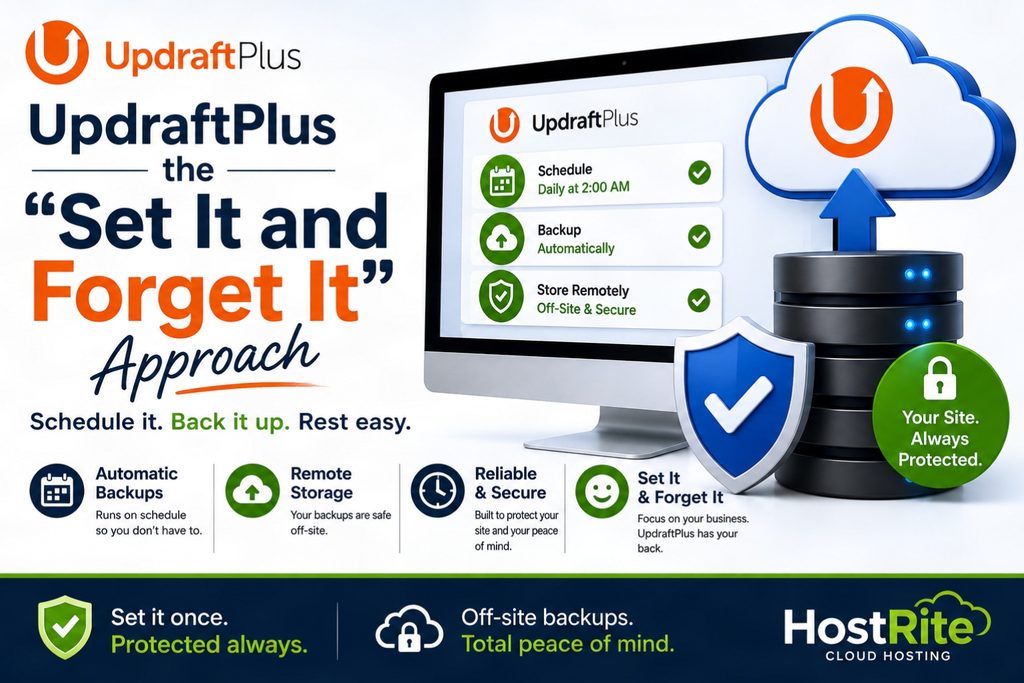
HostRite Likes the “Set It and Forget It” Approach
A backup strategy shouldn’t depend entirely on someone remembering to click a button.
People forget.
That’s why scheduled backups are so important.
Once UpdraftPlus is configured correctly, scheduled backups can run automatically and transfer copies to the selected remote destination.
This provides a much more practical approach than manually downloading WordPress files every few days.
Nevertheless, website owners should still periodically verify that backups are actually completing successfully.
Automation is valuable.
Verification is equally important.
Restoring WordPress with UpdraftPlus
Of course, creating backups is only useful if you can restore them.
UpdraftPlus provides restoration directly through WordPress.
Users can select an existing backup, choose Restore, select the components they want recovered and let UpdraftPlus perform the restoration. (TeamUpdraft)
This can include components such as:
- Plugins
- Themes
- Uploads
- Database
- Other backed-up files
For HostRite, restoration usability is extremely important.
A backup system shouldn’t become incomprehensibly complicated at the exact moment you’re dealing with a broken website.
You Don’t Necessarily Have to Restore Everything
Another useful feature is selective restoration.
Suppose a plugin update causes a problem.
You may not necessarily want to overwrite every component of your WordPress installation.
UpdraftPlus allows restoration of individual components.
Premium provides even more granular backup and restoration capabilities, including individual database tables and additional files outside the normal WordPress content directory. (TeamUpdraft)
This gives website owners more control over recovery.
Automatic Backups Before WordPress Updates
This is another Premium feature HostRite considers particularly useful.
WordPress core, plugin and theme updates are necessary.
However, updates occasionally cause compatibility problems.
UpdraftPlus Premium can automatically create a backup immediately before:
- WordPress core updates
- Plugin updates
- Theme updates
Therefore, if an update causes a serious problem, you have a recent recovery point created immediately beforehand. (TeamUpdraft)
That’s far better than discovering your newest usable backup is several days old.
Incremental Backups Can Reduce Server Work
UpdraftPlus Premium also supports incremental file backups.
Instead of repeatedly backing up every file, incremental backups capture changes since the previous backup.
This can reduce the amount of duplicate data being processed and stored. TeamUpdraft specifically positions incremental backups as a way to save server resources. (TeamUpdraft)
This becomes increasingly valuable as WordPress websites grow.
A small site may not make the difference obvious.
However, repeatedly creating full backups of a very large website can require substantially more resources.
Advanced Retention Rules Help Manage Remote Storage
Remote storage isn’t necessarily unlimited.
Therefore, backup retention matters.
UpdraftPlus Premium includes advanced retention rules that can automatically reduce the number of backups retained as those backups get older. (TeamUpdraft)
For example, you may want numerous recent recovery points while needing fewer historical copies from several months ago.
A retention strategy can help balance:
Recovery flexibility
against
Storage consumption
This is particularly useful when you’re paying for remote cloud storage.
Backup Reports Help Confirm Things Are Working
One mistake website owners can make is assuming that because backups are scheduled, everything must be working.
That’s dangerous.
UpdraftPlus Premium provides detailed reports that can be delivered by email. It also supports cryptographic checksums for verifying backup-file integrity. (TeamUpdraft)
This gives website owners better visibility into their backup process.
At HostRite, we think this matters because an unverified backup shouldn’t automatically be treated as a guaranteed recovery plan.

UpdraftPlus Also Handles WordPress Migration
Although HostRite particularly appreciates the backup functionality, UpdraftPlus isn’t limited to disaster recovery.
It also provides WordPress migration tools.
The plugin can be used when:
- Moving to another hosting provider
- Changing servers
- Moving from development to production
- Creating a development copy
- Changing domains
- Duplicating a WordPress website
The standard migration functionality works by creating a backup of the source site and restoring it at the destination.
Furthermore, UpdraftPlus includes search-and-replace functionality and automated migration cleanup processes. (TeamUpdraft)
Premium Provides Direct Site-to-Site Migration
Premium makes migration considerably more powerful.
Two WordPress websites can be linked so migrations can be performed directly between them.
For example:
Production Website → Development Website
Make changes.
Then:
Development Website → Production Website
Premium also supports selective migration, allowing specific themes, plugins or database tables to be chosen. (TeamUpdraft)
For developers and agencies, this can be extremely useful.
UpdraftPlus Premium Can Back Up More of WordPress
The free version handles the standard WordPress content directory and normal WordPress database tables.
Premium expands backup coverage.
For example, it can include:
wp-config.php- Additional server directories
- Files outside
wp-content - Individual database tables
- Non-WordPress database tables
- External MySQL databases
These capabilities make Premium considerably more appropriate for non-standard or complex WordPress installations. (TeamUpdraft)
Database Encryption Provides Additional Protection
Backups can contain sensitive information.
Therefore, protecting the backup itself matters.
UpdraftPlus Premium provides database encryption functionality. It also includes the ability to anonymize personal data before backup for privacy-oriented workflows. (TeamUpdraft)
UpdraftVault additionally encrypts data during transmission and at rest in its storage infrastructure. (TeamUpdraft)
Security-conscious website owners should pay attention to these features when designing their backup strategy.
Is UpdraftPlus Easy Enough for Beginners?
In HostRite’s experience and assessment, yes.
One of the plugin’s strengths is that a basic backup strategy doesn’t require extensive technical knowledge.
The general process is:
Install UpdraftPlus → Choose a backup schedule → Select remote storage → Authenticate the storage provider → Save the settings → Verify backups
That’s manageable for many WordPress website owners.
However, advanced options remain available when needed.
Therefore, a beginner can start relatively simply without necessarily outgrowing the plugin later.
UpdraftPlus Free vs. Premium
Both versions can provide useful WordPress backup protection.
However, there are significant differences.
| Feature | Free | Premium |
|---|---|---|
| Manual backups | ✓ | ✓ |
| Scheduled backups | ✓ | ✓ |
| Google Drive | ✓ | ✓ |
| Dropbox | ✓ | ✓ |
| Amazon S3 | ✓ | ✓ |
| Remote backups | ✓ | ✓ |
| Multiple simultaneous remote locations | — | ✓ |
| OneDrive | — | ✓ |
| Microsoft Azure | — | ✓ |
| Google Cloud | — | ✓ |
| Backblaze | — | ✓ |
| SFTP/SCP | — | ✓ |
| WebDAV | — | ✓ |
| Incremental backups | — | ✓ |
| Automatic backups before updates | — | ✓ |
| Advanced retention | — | ✓ |
| Database encryption | — | ✓ |
| WordPress Multisite | — | ✓ |
| Premium support | — | ✓ |
These distinctions are documented in TeamUpdraft’s current Free vs. Premium comparison. (TeamUpdraft)
Is UpdraftPlus Premium Worth It?
For a simple personal website, the free version can be a perfectly reasonable starting point.
However, HostRite believes Premium becomes much easier to justify when the WordPress website has significant value.
That includes websites that:
- Generate revenue
- Produce business leads
- Accept online orders
- Contain frequently changing information
- Serve customers
- Have substantial content
- Would be expensive to rebuild
- Are managed professionally for clients
The ability to back up to multiple remote locations is particularly important to our assessment.
Add incremental backups, automatic pre-update backups, expanded storage providers, advanced retention and Premium support, and the upgrade becomes much more than a collection of minor extras.
What HostRite Likes Most About UpdraftPlus
After actually using UpdraftPlus, remote backup flexibility is at the top of HostRite’s list.
We particularly like that website owners aren’t forced into one proprietary storage service.
You can choose from mainstream options such as:
Google Drive
Dropbox
Amazon S3
or move into more advanced Premium destinations such as:
Microsoft OneDrive
Microsoft Azure
Google Cloud
Backblaze
SFTP
WebDAV
pCloud
Furthermore, Premium can maintain backups in more than one remote destination simultaneously. (TeamUpdraft)
That combination of choice and redundancy is exactly what we want to see from a serious WordPress backup plugin.
What Could UpdraftPlus Improve?
No product is perfect, even when we give it five stars.
The biggest limitation is straightforward:
Many of the best advanced features require Premium.
In particular:
- Multiple remote backup locations
- Incremental backups
- Automatic pre-update backups
- Advanced retention
- Additional cloud-storage providers
- Expanded backup coverage
- Premium support
are paid features. (TeamUpdraft)
Additionally, the number of configuration options may initially seem overwhelming to a new WordPress user.
However, we don’t consider either issue serious enough to reduce our overall rating.
The free version remains genuinely useful, while Premium is intended for website owners who need more sophisticated protection.
UpdraftPlus Pros and Cons
H3: Pros
- Excellent remote backup support
- Free version available
- Scheduled automatic backups
- Google Drive backup
- Dropbox backup
- Amazon S3 backup
- Numerous additional Premium storage providers
- Multiple remote destinations with Premium
- Integrated UpdraftVault storage
- Easy WordPress restoration
- Selective restoration
- Incremental backups with Premium
- Automatic backups before updates
- Advanced retention rules
- WordPress migration tools
- Direct site-to-site migration
- Database encryption
- WordPress Multisite support
- Detailed backup reporting
- Premium support available
H3: Cons
- Several advanced features require Premium
- Numerous options may initially overwhelm beginners
- Remote-storage capacity may involve separate costs
- Large websites can consume substantial backup space
- Proper configuration still requires some initial setup
For HostRite, the advantages substantially outweigh those disadvantages.

H2: Frequently Asked Questions About UpdraftPlus
H3: Does HostRite Actually Use UpdraftPlus?
Yes. HostRite uses UpdraftPlus on this website.
Therefore, this review reflects our experience with the plugin as well as our evaluation of its current capabilities.
H3: Can UpdraftPlus Store Backups Away From My Hosting Server?
Yes.
In fact, remote storage is one of the features HostRite likes most about UpdraftPlus.
The plugin supports several off-site storage providers, including Google Drive, Dropbox and Amazon S3. Premium adds even more choices. (TeamUpdraft)
H3: Why Should I Store WordPress Backups Remotely?
Because storing the website and its only backup on the same server can create a single point of failure.
If that server becomes inaccessible, the backup could also become inaccessible.
TeamUpdraft itself strongly recommends remote storage for this reason. (TeamUpdraft)
H3: Can UpdraftPlus Back Up to Multiple Remote Locations?
Yes, with UpdraftPlus Premium.
You can configure more than one remote destination, providing additional redundancy if one backup location becomes unavailable. (TeamUpdraft)
H3: Can UpdraftPlus Back Up to Google Drive?
Yes.
Google Drive is available with the free version.
H3: Can UpdraftPlus Back Up to Dropbox?
Yes.
Dropbox remote backup is supported.
H3: Can UpdraftPlus Back Up to Amazon S3?
Yes.
Amazon S3 is supported, and Premium adds additional S3 functionality.
H3: Can UpdraftPlus Back Up to OneDrive?
Yes, with Premium.
H3: Can UpdraftPlus Back Up Using SFTP?
Yes, with Premium.
H3: What Is UpdraftVault?
UpdraftVault is TeamUpdraft’s integrated off-site backup-storage service.
Premium currently includes 1GB of UpdraftVault storage, and additional capacity can be purchased. (TeamUpdraft)
H3: Can UpdraftPlus Automatically Back Up WordPress?
Yes.
You can configure automatic schedules ranging from every few hours to monthly backups.
H3: Can UpdraftPlus Restore WordPress?
Yes.
Backups can be selected and restored through the plugin’s WordPress interface.
H3: Can UpdraftPlus Migrate a WordPress Website?
Yes.
Migration is supported, while Premium provides additional functionality including direct site-to-site migration.
H3: Is UpdraftPlus Premium Worth It?
HostRite believes it can be well worth the upgrade for business-critical websites.
We particularly value multiple remote backup locations, incremental backups, automatic backups before WordPress updates and the expanded selection of cloud-storage providers.
H2: Final Verdict — HostRite’s UpdraftPlus Review
After actually using UpdraftPlus on this website and examining its broader backup capabilities, HostRite gives UpdraftPlus a full five-star rating.
The plugin does the fundamentals well.
It can create scheduled WordPress backups.
It can restore those backups.
It can migrate websites.
However, remote backup storage is what particularly impresses us.
The ability to move WordPress backups away from the production hosting server and into Google Drive, Dropbox, Amazon S3 or another independent storage system creates a much stronger backup strategy than simply leaving the only backup alongside the website.
Premium takes this further.
You gain additional storage providers and, importantly, the ability to maintain backups in multiple remote locations simultaneously. (TeamUpdraft)
For us, that’s not simply another feature on a checklist.
It’s meaningful redundancy.
If one backup location becomes inaccessible, another independent copy may still be available.
Combined with incremental backups, automatic pre-update backups, advanced retention rules, database encryption, migration tools and detailed reporting, UpdraftPlus Premium becomes a remarkably comprehensive WordPress backup solution. (TeamUpdraft)
H3: HostRite’s UpdraftPlus Rating
Overall Rating: ⭐⭐⭐⭐⭐ 5/5
Remote Backup Features: 5/5
Cloud Storage Options: 5/5
Backup Features: 5/5
Restoration Features: 5/5
Ease of Use: 4.8/5
Migration Features: 4.9/5
Premium Features: 5/5
Value for Money: 4.8/5
H3: Who Does HostRite Recommend UpdraftPlus For?
We recommend considering UpdraftPlus for:
- WordPress bloggers
- Small-business websites
- Ecommerce stores
- Professional websites
- Developers
- Freelancers
- Agencies
- Website owners who want off-site backups
- Anyone who doesn’t want their only WordPress backup stored on the same server as their website
For a smaller personal website, UpdraftPlus Free provides an excellent starting point.
For an important business or revenue-producing website, however, HostRite believes UpdraftPlus Premium deserves serious consideration, particularly because of its advanced remote-storage and redundancy capabilities.
Ultimately, our reasoning is simple:
A WordPress backup is important. An independently accessible remote backup is better. Multiple independent backup locations are better still.
That’s an area where UpdraftPlus performs exceptionally well.
Based on HostRite’s actual use of UpdraftPlus on this website, combined with its excellent remote-storage options, restoration tools and Premium backup features, HostRite gives UpdraftPlus a full ⭐⭐⭐⭐⭐ 5-star recommendation.